However, the choice between Home and Pro often depends on how the system will be used. Windows 11 Home Vs Pro highlights the key differences in features, security tools, system control, and professional capabilities, helping users understand which version suits them best.
While Windows 11 Home focuses on simplicity, smooth everyday performance, and gaming efficiency for personal users, Windows 11 Pro is built for professionals, businesses, and advanced users who require enhanced security, remote access, virtualization, and administrative control.
| Section | Summary |
| Introduction | Windows 11 Home Vs Pro compares two editions with the same base system but different target users. |
| Purpose | Home is for personal use; Pro is designed for professionals and businesses. |
| Core Difference | Home focuses on simplicity, Pro focuses on control and advanced features. |
| Performance | Both versions deliver the same speed, responsiveness, and gaming performance. |
| Security | Pro includes BitLocker and advanced protection; Home offers basic security tools. |
| Remote Access | Pro supports Remote Desktop; Home has no built-in hosting feature. |
| Business Use | Pro is suitable for organizations; Home is not designed for enterprise management. |
| Virtualization | Pro supports Hyper-V and advanced system tools; Home does not. |
| Gaming Experience | Identical gaming performance with DirectX 12, Auto HDR, and DirectStorage. |
| System Requirements | Both require the same hardware specifications and run equally well. |
| Interface | Both share the same Windows 11 design, UI, and user experience. |
| Updates | Pro allows more control over updates; Home has standard update settings. |
| Pricing | Home is cheaper, Pro is more expensive due to extra features. |
| Security Level | Pro offers enterprise-grade security; Home is suitable for general users. |
| Remote Work | Pro is ideal for remote access and IT support environments. |
| Ease of Use | Home is simpler and more user-friendly for beginners. |
| Advanced Control | Pro provides Group Policy Editor and deeper system customization. |
Windows 11 Home Vs Pro
Windows 11 Home vs Pro is a comparison between two editions of Microsoft’s latest operating system, designed to serve different types of users while sharing the same core experience. These versions primarily target everyday users such as students, families, and casual computer users who need a smooth, fast, and reliable system for basic tasks like browsing, streaming, gaming, and productivity.
It includes all essential features of Windows 11 with a clean interface and strong built-in security, making it suitable for general personal use. On the other hand, Windows 11 Pro is designed for professionals, businesses, and advanced users who require more control, stronger security, and additional management tools.
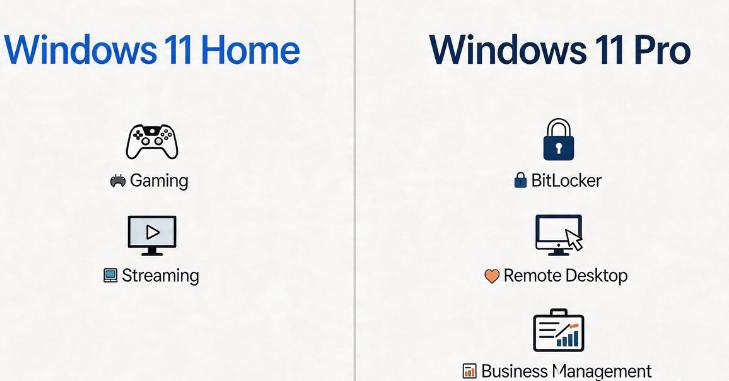
It includes all features of Windows 11 Home but adds powerful capabilities such as BitLocker encryption for enhanced data protection, Remote Desktop access for working from anywhere, Group Policy Editor for system customization, and Hyper-V virtualization for running multiple operating systems.
Feature Comparison Between Windows 11 Home and Pro
| Feature Category | Windows 11 Home | Windows 11 Pro |
| User Type | Personal users, students | Professionals, businesses |
| Security | Basic Windows Security | Advanced security tools |
| Remote Desktop | Not available | Available |
| BitLocker Encryption | Not available | Full support |
| Group Policy Editor | Not available | Available |
| Hyper-V Virtualization | Not available | Supported |
| Assigned Access | Not available | Available |
| Update Control | Basic control | Advanced management |
| Domain Join | Not supported | Supported |
| Price | Lower | Higher |
Performance Differences

In terms of raw performance, both Windows 11 Home and Windows 11 Pro operate almost identically because they are built on the same core operating system. This means there is no significant difference in speed, gaming performance, or overall system responsiveness between the two editions.
However, Windows 11 Pro may feel slightly more efficient in professional environments due to its additional management and control features. It is better suited for handling multitasking in business workloads, supports advanced system and memory management tools, and offers improved optimization options in enterprise or organizational setups.
Security Features Comparison
Security is one of the biggest differences between the two editions.
- Windows Defender Antivirus
- Firewall protection
- Device encryption (basic)
- App and browser control
- Parental controls
Windows 11 Pro Security Features
- BitLocker full disk encryption
- Advanced firewall settings
- Group Policy security control
- Windows Information Protection
- Enterprise-grade protection tools
- BitLocker in Windows 11 Pro is especially important because it protects data even if the device is stolen or accessed without permission.
Remote Access and Work Features

| Feature Area | Windows 11 Home | Windows 11 Pro |
| Remote Desktop Hosting | Does not support built-in Remote Desktop hosting | Full Remote Desktop support |
| Remote Access | Limited or requires third-party tools | Ability to access PC from anywhere |
| Work-from-Home Management | Limited work-from-home management tools | Advanced remote work and management features |
| Professional Use Case | Basic home usage, limited remote capabilities | Ideal for IT support and remote work setups |
Virtualization and Advanced Tools
Windows 11 Pro includes advanced technical tools that are not available in the Home edition.
These include:
- Hyper-V virtualization for running multiple operating systems
- Windows Sandbox for testing applications safely
- Group Policy Editor for system configuration
- Domain Join for business networks
Gaming Experience

Both Windows 11 Home and Windows 11 Pro deliver excellent gaming performance because they are built on the same core system architecture and include the same modern gaming technologies. Both editions support advanced features such as DirectX 12 Ultimate, which enhances graphics quality and rendering efficiency, and Auto HDR for improved color and visual depth in supported games.
Direct Storage for faster loading times by reducing CPU bottlenecks, and Xbox Game Bar integration for in-game capture, performance monitoring, and communication tools. Since these gaming features are identical in both versions, there is no noticeable difference in FPS, responsiveness, or overall gaming performance between Windows 11 Home and Pro.
Business and Professional Use
Windows 11 Pro is clearly designed for business environments.
It offers:
- Device management for organizations
- Secure network access
- User access control
- Enterprise update management
- Professional deployment tools
- Windows 11 Home lacks these features, making it unsuitable for business-scale operations.
Ease of Use and Interface

Both versions share the same modern Windows 11 interface, including:
- Centered Start Menu
- Rounded window design
- Snap Layouts for multitasking
- Widgets panel
- Microsoft Store integration
- There is no difference in appearance or user experience between Home and Pro editions.
System Requirements
Both Windows 11 Home and Windows 11 Pro use the same system requirements, so they run on identical hardware without any major compatibility differences. Both editions require a 1 GHz or faster compatible processor, at least 4 GB of RAM, and a minimum of 64 GB of storage space to ensure basic functionality.
In addition, both versions must support TPM 2.0 (Trusted Platform Module) and Secure Boot capability, which are essential for modern security standards and system protection. Because the hardware requirements are the same, neither edition has a performance advantage over the other at the system level, and users can expect similar speed and responsiveness when using either Windows 11 Home or Pro on the same device.
Pricing Difference
Windows 11 Home:
- More affordable
- Usually pre-installed on consumer devices
Windows 11 Pro:
- Higher price
- Additional cost for business and advanced features
- The price difference reflects the extra tools and security features included in Pro.
Which One Should You Choose?
| Option | When to Choose | Details |
| Windows 11 Home | You are a student or casual user | Best for everyday tasks like studying, browsing, streaming, and basic productivity |
| Windows 11 Home | You use your PC for browsing, streaming, or gaming | Offers smooth performance and excellent gaming support without advanced business tools |
| Windows 11 Home | You do not need advanced security or business tools | Simple, user-friendly system with basic built-in protection |
| Option | When to Choose | Details |
| Windows 11 Pro | You are a professional or business user | Designed for workplace productivity, advanced control, and enterprise use |
| Windows 11 Pro | You need remote access and system control | Includes Remote Desktop and advanced system management features |
| Windows 11 Pro | You require advanced security like BitLocker | Provides strong data protection and enterprise-level security tools |
| Windows 11 Pro | You work in IT, development, or enterprise environments | Supports virtualization, domain join, and advanced administrative tools |
Conclusion
Windows 11 Home Vs Pro offers a clear distinction between two powerful editions of Microsoft’s modern operating system, both built on the same stable foundation but designed for different types of users. Windows 11 Home is ideal for everyday users who want a smooth, simple, and efficient experience.
On the other hand, Windows 11 Pro targets professionals, businesses, developers, and IT environments that require advanced control, stronger security, and remote management. With features like BitLocker encryption, Hyper-V virtualization, Group Policy Editor, and Remote Desktop access, it provides a more powerful and flexible computing environment.
Want to know about Intel Nova Lake Explained: Release Date, Specs, Architecture, and 10 Game-Changing Features Revealed Check out our Technology category.
FAQs
The main difference is that Windows 11 Home targets personal use, while Windows 11 Pro includes advanced features like BitLocker, Remote Desktop, and business management tools.
No, both versions have the same performance because they share the same core system and hardware requirements.
Both Windows 11 Home and Pro offer identical gaming performance, including DirectX 12 Ultimate, Auto HDR, and DirectStorage support.
For most casual users, Windows 11 Home is enough. Pro is only worth it if you need advanced security, remote access, or business tools.
Yes, Microsoft allows users to upgrade from Home to Pro at any time by purchasing a Pro license through system settings.